
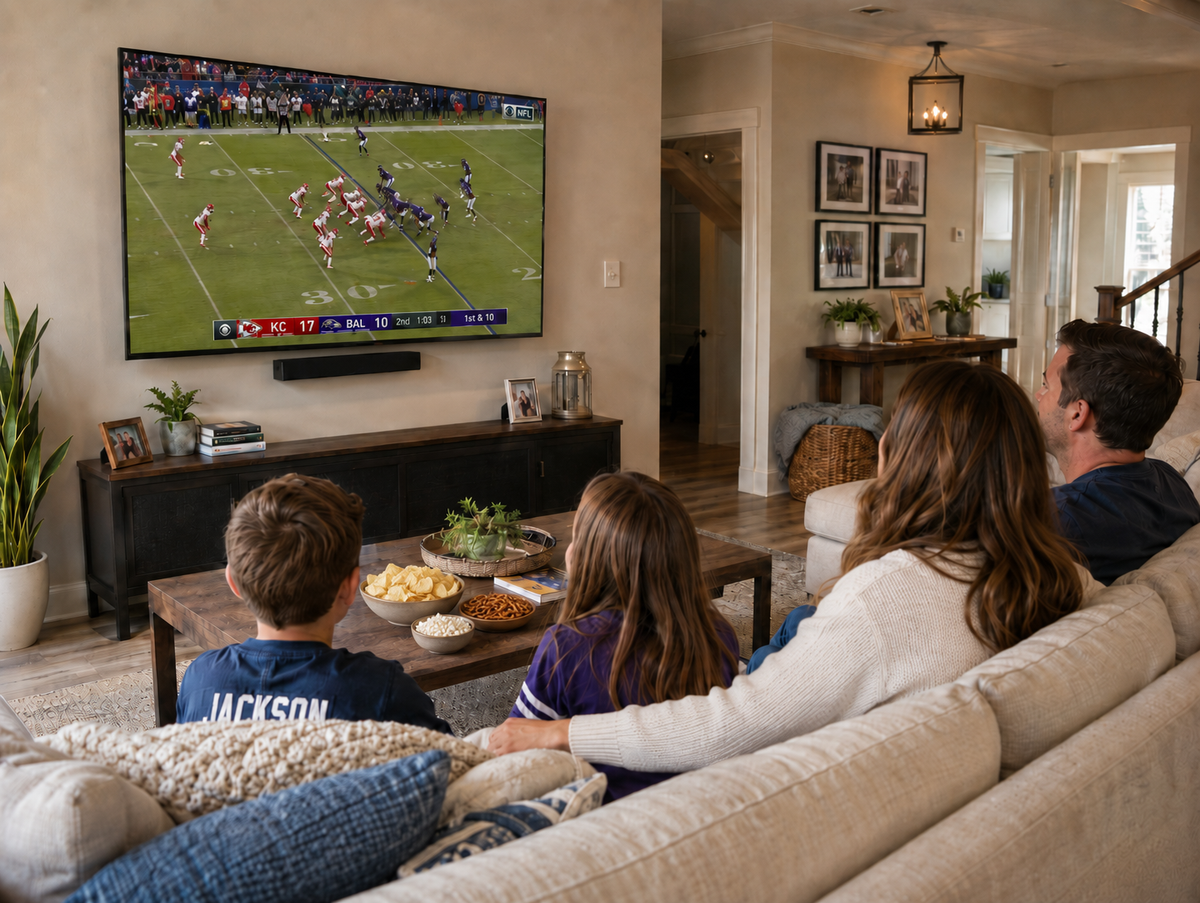
Football Season Is Coming, Is Your Living Room Ready?
Football season has a way of sneaking up on you. One minute it's late summer, the next your group chat is already planning your weekend game days, and you're realizing your TV is still balanced on a wobbly console from three apartments ago. Before the first kickoff, it's worth taking some time to actually set up a space built for game days, not just tolerate whatever setup you've had since move-in day.
A good watch party isn't just about screen size. It's about sightlines, sound, food within reach, and not tripping over a mess of HDMI cables every time someone gets up for another snack.
Here's how to get your space game-day ready before the season starts.
Get the Mounting Angle Right
The single biggest upgrade for any watch party setup is getting your TV off the stand and onto a mount that actually works for your room. If your couch is directly across from the TV, a fixed mount does the job fine. But most living rooms aren't that simple. Maybe your seating wraps around a corner, or you've got a kitchen island where people gather during commercial breaks.
That's where a full-motion TV mount earns its spot, and the MOUNT-VW085L is the perfect choice. Being able to tilt and swivel the screen means everyone gets a clear view, whether they're on the couch, pulled up a bar stool, or standing in the doorway with a plate of nachos. It also means you're not stuck rearranging furniture around a fixed screen every time you want to host a bigger group.
For anyone dealing with glare from windows or overhead lighting, tilting the mount downward slightly can cut reflections without needing blackout curtains. Small adjustment, noticeably better picture during afternoon games.
Build a Snack Station That Doesn't Interrupt the Game
Nothing kills momentum during a close game like someone blocking the TV on a chip run. A dedicated snack station off to the side, on a rolling cart or small side table, keeps food accessible without turning the living room into a buffet line mid-play.
Keep it simple: a tray for dips, a spot for drinks, and napkins within arm's reach. If space is tight, a compact cart that can be tucked against a wall between games works better than trying to clear off a coffee table every weekend.
Tame the Cable Chaos Behind the Setup
Once the mount is up and the snack station is sorted, the last thing standing between you and a clean setup is the tangle of cables running from your TV, soundbar, streaming box, and gaming console. Exposed cables aren't just messy, they're also a tripping hazard when the room fills up with guests during a big game.
A cable management box kit or raceway channel run along the wall or behind furniture keeps everything hidden and organized. It's a fifteen-minute fix that makes the whole setup look intentional instead of thrown together, and it means you're not unplugging the wrong thing trying to find the right cord during halftime.
Don't Forget the Sound
Picture quality gets most of the attention, but sound is what actually makes a game feel live. TV speakers tend to fall flat once a room fills up with people talking over the broadcast. If a full soundbar setup isn't in the budget or space, even a compact soundbar mounted just below the TV makes a real difference, and it keeps the area under the screen clear for other gear. VIVO has you covered with our Speaker Mounts and Stands for your soundbars and speakers.
If you're mounting a soundbar, make sure it's positioned so the mount doesn't interfere with your TV's tilt range. Worth checking before game day, not during it.
Set Up a Second Screen for Multi-Game Sundays
For the true football fans juggling multiple games at once, a second monitor or smaller secondary TV can keep an eye on other matchups without switching away from the main game. A monitor mount or small TV stand like the STAND-TV07 in a kitchen, adjacent room, or even right next to the big screen means whoever's manning the grill, refilling drinks, or not wanting to miss multiple games never misses a single play.
Ready for Kickoff
None of this requires a full renovation. A solid mount, a spot for snacks, hidden cables, and decent sound cover most of what makes a watch party actually work. Handle it before the season starts, and you'll spend the next few months focused on the games instead of fixing your setup between them.

Share:
Preparing Commercial Spaces for Q4 Like a PRO: Why Durability Matters
VIVO Named a Top Standing Desk Setup Brand by DeskRated in 2026