
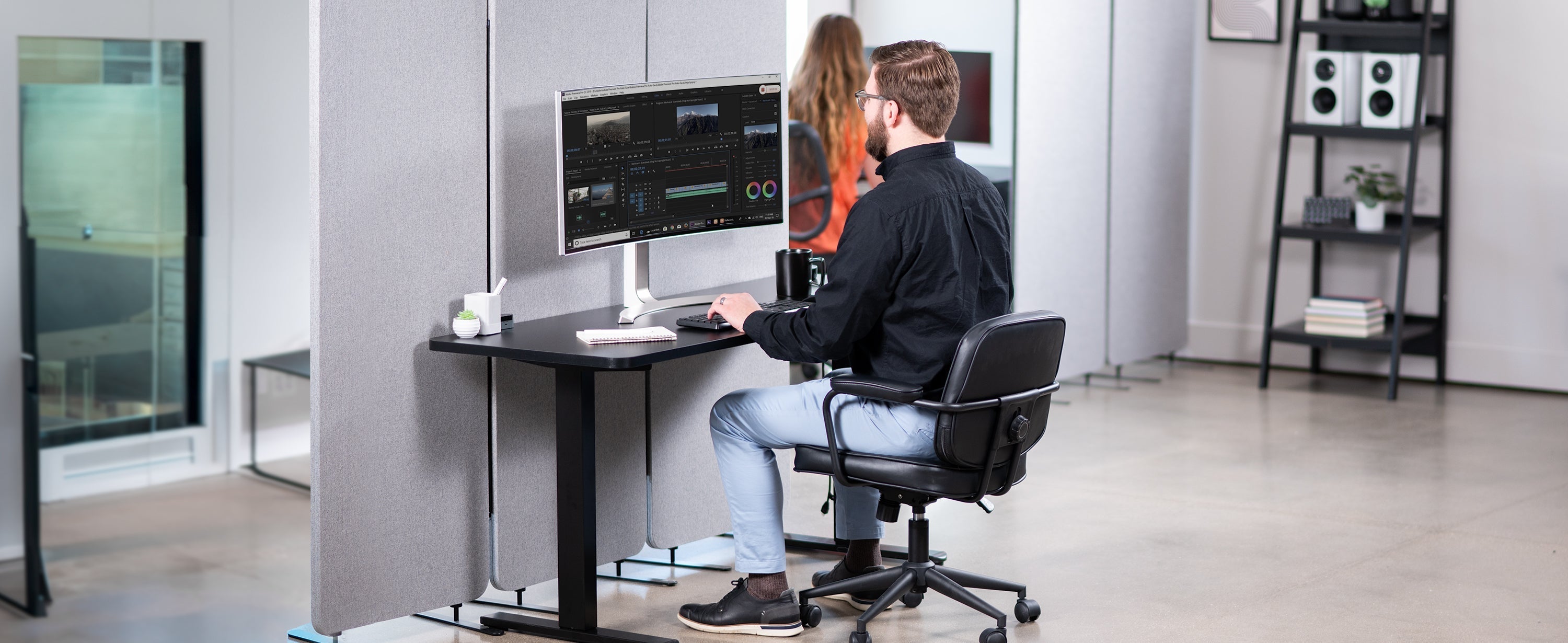
As National Posture Month kicks off this May, it’s the perfect time to look beyond just "sitting up straight." For many of us, our workstation has become our primary environment, often for eight or more hours a day. While it might seem like a minor detail, the way we align our bodies while working has a profound impact on our energy, focus, and long-term physical health.
The human head weighs approximately 12 pounds, but for every inch it tilts forward toward a screen, the effective weight on your neck muscles can double. This "tech neck" is a leading cause of the chronic headaches and shoulder tension that many office workers accept as "part of the job." By implementing a few strategic workstation hacks, you can shift from a state of physical strain to one of supported productivity.
Aligning the Body with the 90-Degree Rule
The foundation of a healthy workspace is built on angles. To minimize the load on your joints, aim for a consistent 90-degree alignment. When seated, your elbows should be tucked comfortably at your sides, forming an L-shape as you reach for your keyboard. Similarly, your hips and knees should also maintain 90-degree angles, with your thighs parallel to the floor. This neutral positioning prevents the pelvic tilting that often leads to lower back pain.
Stabilizing Your Foundation
A common ergonomic pitfall occurs when we adjust our chairs for desk height, leaving our feet dangling or tucked under the seat. This lack of support pulls the spine out of its natural alignment and restricts circulation. If your feet don't rest flat on the floor, a dedicated footrest is essential. For example, the VIVO Height Adjustable Footrest (STAND-FT01) provides the necessary elevation and stable surface to keep your pelvis neutral and your legs active throughout the day.
Finding the Ideal Viewing Distance
Eye strain and neck pain are frequently caused by improper monitor placement. You can perform a quick check using the "Arm’s Length Test": extend your arm toward your screen; your fingertips should just barely touch the surface. If you find yourself leaning forward to read small text, your monitor is likely too far away, or too low.
To keep your neck in a neutral position, the top third of your screen should be at eye level. If you struggle with a fixed desk height, a VIVO Monitor Mount allows you to customize the height and tilt of your display precisely, ensuring you aren't constantly tilting your chin down or up.
Optimizing Your Input Zone
Your keyboard and mouse should be treated as an extension of your natural reach. If you have to reach forward or upward to type, you are placing constant stress on your rotator cuffs and wrists. Ideally, your keyboard should be positioned so your elbows stay at a 90–120 degree angle. If your desk surface is too high to allow for this, an under-desk VIVO Keyboard Tray (MOUNT-KB05E) can bring your tools down to a more ergonomic level, allowing your shoulders to remain relaxed and your wrists to stay flat.
Integrating the Power of Movement
Even the most perfectly aligned setup becomes a burden if you stay in it for too long. The human body is designed for dynamic movement, not static poses. Modern ergonomics experts suggest following the 20-8-2 Rule: for every 30 minutes of work, aim for 20 minutes of sitting, 8 minutes of standing, and 2 minutes of moving or stretching.
Tools like VIVO Standing Desks make this transition seamless, allowing you to alternate positions without breaking your workflow. During your two-minute "micro-breaks," try simple movements like "butterfly wings"—placing your hands on your shoulders and pulling your elbows back until your shoulder blades touch—to reset your chest and upper back muscles.
By treating your workstation as a dynamic environment rather than a static furniture set, you're doing more than just celebrating National Posture Month; you're investing in a pain-free, high-energy professional life.

Share:
The Ultimate Mother’s Day Office Upgrade: High-Style, High-Comfort Gift Ideas
Level Up Your Focus: Why Dual Monitor Ergonomics is the Secret to Pain-Free Productivity